ADAPT - Guidance / GpsSource Discussion
Note: How do we want to use north & east offsets? When someone shifts a guidance line, should we modify the guidance line, record an event with the documentation / logged data, or clone the guidance line into a new object with different offsets? Is the operator nudging a guidance line something worth recording, or is it a non-repeatable event?
Decision to ignore nudge events pending additional input or use cases documenting a relevant need.
20150915: ISO handles this by capturing the nudge as a guidance offset element (tag GuidanceShift, GST) that is recorded as an event. It includes shift (2-D translation) and Offset (translation perpendicular to the track, which can involve a radius change.)
20150915: Q: Should we add GST elements for the purposes of ISO11783 conformance test compatibility?
A: The agreement is that we are inserting this for the strict purposes of passing AEF conformance tests, as opposed to scope creep. This would entail a) Creating the equivalent of the GST class. b) Creating the mechanism to insert it in the context of LoggedData, akin to an ASP.
Note: Decided to remove AdaptiveCurve guidance types in favor of creating a guidance group containing multiple AB Curve objects. Noted that AdaptiveCurve is a setting for the steering and guidance system rather than a valid type of predefined guidance line.
GuidanceAllocation
| Attribute | Type | Multiplicity | Description |
|---|---|---|---|
| Id | CompoundIdentifier | 1 | Compound identifier that allows instances of this object to be referenced from multiple other objects. |
| GuidanceGroupId | Integer | 1 | |
| TimeScopes | TimeScope | 0..n | |
| GuidanceShift | GuidanceShift | 0..1 |
GuidanceGroup
| Attribute | Type | Multiplicity | Description |
|---|---|---|---|
| Id | CompoundIdentifier | 1 | Compound identifier that allows instances of this object to be referenced from multiple other objects. |
| Description | String | 0..1 | |
| GuidancePatternIds | Integer | 1..* | |
| BoundingPolygon | MultiPolygon | 0..1 | An optional boundary for this line. The boundary can be used to limit the validity of a GuidancePattern to a certain area. This boundary shall fit inside the GuidanceGroup and Partfield boundaries. Note that each boundary polygon can have interior boundaries in addition to the exterior boundary to designate exclusion zones. |
GuidanceShift
| Attribute | Type | Multiplicity | Description |
|---|---|---|---|
| GuidanceGroupId | Integer | 1 | |
| GuidancePatternId | Integer | 1 | |
| EastShift | NumericRepresentationValue | 0..1 | |
| NorthShift | NumericRepresentationValue | 0..1 | |
| PropagationOffset | NumericRepresentationValue | 0..1 | |
| TimeScopeIds | Integer | 0..* |
GuidancePattern
| Attribute | Type | Multiplicity | Description |
|---|---|---|---|
| Id | CompoundIdentifier | 1 | Compound identifier that allows instances of this object to be referenced from multiple other objects. |
| GuidancePatternType | GuidancePatternTypeEnum | 1 | |
| GpsSource | GpsSource | 1 | |
| OriginalEpsgCode | String | 0..1 | Documents the original spatial coordinate system of the data if the GuidancePattern was recorded in something other than WGS84. (This would indicate that the points have been re-projected.) |
| Description | String | 0..1 | |
| SwathWidth | NumericRepresentationValue | 0..1 | |
| PropagationDirection | PropagationDirectionEnum | 0..1 | 1 = BothDirections 2 = LeftOnly 3 = RightOnly 4 = NoPropagation The direction is defined while standing on the first point (A) and looking to the next point . When this attribute is not defined in the GuidancePattern then propagation shall be applied in both directions. |
| Extension | GuidanceExtensionEnum | 0..1 | 1 = FromBothPoints (From both first and last point ) 2 = FromA (From first point (A) only) 3 =FromB (From last point (B) only ) 4 = None (No extensions) When this attribute is not defined in the GuidancePattern then extensions shall be applied from both first and last point. Extension means that guidance shall be continued when the specified point of the GuidancePattern is passed. The GuidancePattern is extended by the guidance system. |
| NumberOfSwathsLeft | Integer | 0..1 | Number of swaths to propagate GuidancePattern to the left. The direction is defined while standing on the first point (A) and looking to the next point. When this attribute is not defined, the propagation to the left is not bound by a specific number of swaths and follows attribute GuidancePatternPropagationDirection |
| NumberOfSwathsRight | Integer | 0..1 | Number of swaths to propagate GuidancePattern to the right. The direction is defined while standing on the first point (A) and looking to the next point. When this attribute is not defined, the propagation to the right is not bound by a specific number of swaths and follows attribute GuidancePatternPropagationDirection |
| BoundingPolygon | MultiPolygon | 0..1 | An optional boundary for this line. The boundary can be used to limit the validity of a GuidancePattern to a certain area. This boundary shall fit inside the GuidanceGroup and Partfield boundaries. Note that each boundary polygon can have interior boundaries in addition to the exterior boundary to designate exclusion zones. |
GpsSource
| Attribute | Type | Multiplicity | Description |
|---|---|---|---|
| SourceType | GpsSourceEnum | 1 | We have an enumeration in the ArgoUML model, which represents the union of a) John Deere GPS source terms, b) ISO PTN Attribute S (PositionStatus), nd c) Some typical FMIS usages (e.g., "Drawn") We will likely use an EnumeratedRepresentation for this, as the list is expected to grow. Note that the ISO Plug-In should be able to convert any value to an ISO-compatible value. |
| EstimatedPrecision | NumericRepresentationValue | 0..1 | |
| HorizontalAccuracy | NumericRepresentationValue | 0..1 | |
| VerticalAccuracy | NumericRepresentationValue | 0..1 | |
| NumberOfSatellites | Integer | 0..1 | Inserted for ISO11783 PTN compatibility |
| GpsUtcTime | DateTime | 0..1 | Inserted for ISO11783 compatibility. ISO plug-in will convert to/from this representation and the separate time / date attributes used by ISOXML. |
GuidancePatternTypeEnum
| Enumeration Literal | Description |
|---|---|
| APlus | |
| AbLine | |
| AbCurve | |
| CenterPivot | |
| Spiral |
GuidanceExtensionEnum
| Enumeration Literal | Description |
|---|---|
| FromBothPoints | |
| FromA | |
| FromB | |
| None |
GpsSourceEnum
| Enumeration Literal | Description |
|---|---|
| Unknown | |
| Drawn | |
| MobileGPS | |
| DeereRTK | |
| DeereRTKX | |
| DeereSF1 | |
| DeereSF2 | |
| DeereWAAS | |
| GNSSfix | |
| DGNSSfix | |
| PreciseGNSS | |
| RTKFixedInteger | |
| RTKFloat | |
| EstDRmode | |
| ManualInput | |
| SimulateMode | |
| DesktopGeneratedData | |
| Other | |
| PPP | |
| SBAS | |
| Mechanical |
Sub-classes of GuidancePattern
APlus
| Attribute | Type | Multiplicity | Description |
|---|---|---|---|
| Point | Point | 1 | |
| Heading | Double | 1 |
AbLine
| Attribute | Type | Multiplicity | Description |
|---|---|---|---|
| A | Point | 1 | |
| B | Point | 1 | |
| EastShiftComponent | Double | 0..1 | |
| NorthShiftComponent | Double | 0..1 | |
| Heading | Double | 0..1 |
MultiAbLine
| Attribute | Type | Multiplicity | Description |
|---|---|---|---|
| AbLines | AbLine | 1..* |
AbCurve
| Attribute | Type | Multiplicity | Description |
|---|---|---|---|
| EastShiftComponent | Double | 0..1 | |
| NorthShiftComponent | Double | 0..1 | |
| Shape | LineString | 0..* | |
| Heading | Double | 0..1 | |
| NumberOfSegments | Integer | 1 |
CenterPivot [Not Implemented]
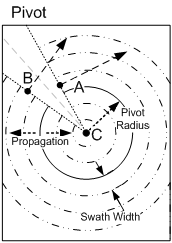
| Attribute | Type | Multiplicity | Description |
|---|---|---|---|
| StartPoint | Point | 1 | "A" point in Pivot diagram |
| EndPoint | Point | 1 | "B" point in Pivot diagram |
| Center | Point | 1 | "C" point in Pivot diagram |
Spiral
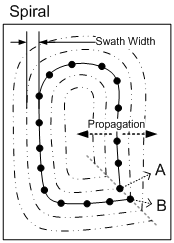
| Attribute | Type | Multiplicity | Description |
|---|---|---|---|
| Shape | LineString | 1 | "A" point in Spiral diagram is the start point, "B" point in Spiral diagram is the last point from where the next parallel path starts. |
PivotGuidancePattern
| Attribute | Type | Multiplicity | Description |
|---|---|---|---|
| StartPoint | Point | 1 | |
| EndPoint | Point | 1 | |
| Center | Point | 1 | |
| Radius | NumericRepresentationValue | 1 | |
| Point1 | Point | 1 | |
| Point2 | Point | 1 | |
| Point3 | Point | 1 | |
| DefinitionMethod | PivotGuidanceDefinitionEnum | 1 |
PivotGuidanceDefinitionEnum
| Enumeration Literal | Description |
|---|---|
| PivotGuidancePatternStartEndCenter | |
| PivotGuidancePatternCenterRadius | |
| PivotGuidancePatternThreePoints |